

Talking from experience here...
Most devs think they need a drawer full of old Android phones and budget laptops to test low-end performance scenarios.
They don't.
There's a better way than wasting money and letting old hardware rot:
If you need to optimize for lower-powered hardware but don't have all the devices you need, stop that eager finger from opening Amazon or eBay.
Instead: use your existing hardware as a proxy for lower-tier hardware by simply choking it.
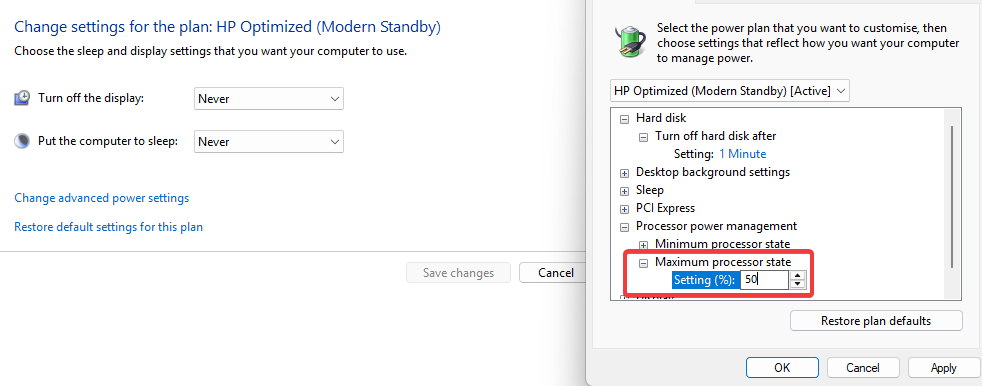
Want to simulate a lower-tier CPU? On Windows, go to Power Settings > Advanced Power Settings > Maximum processor state. Drop that percentage. Suddenly, your 3GHz beast becomes a 1.5GHz potato.
Want to simulate a lower-tier GPU? That's trickier because the controls are vendor-specific, but the logic still applies. On AMD, for example, AMD Adrenalin, MSI Afterburner, Ryzen Master, G-Helper, or even BIOS can limit GPU wattage and/or frequency.
Not perfect simulation.
But who cares about perfection? You should care about being pragmatic.
Full transparency: this is one of the cases where I don't follow my own advice most of the time, but that's because I fix the performance of dozens of very different projects.
But I bet you don't need to go that hardcore. So be pragmatic and stop wasting money. Don't keep a shelf full of old laptops you only used once. Just have a couple of very flexible laptops and apply this trick.
Extra tips from uncle Ruben:
- Only buy laptops with switchable graphics (both iGPU and dGPU). Then switch GPU on a per-project basis. Like a 780m iGPU + 5070/5080/5090 or whatever works for you.
- Use Parsec/RDP for your ultimate, scalable performance lab. This setup lets you measure and fix performance on multiple devices in parallel. Iterate on min vs recommended vs max tier specs. Extra points if you automate this like we do.
These tips will get you far, but if you need my hand on your Unity project, apply for my consulting and let's fix that:
https://thegamedev.guru/unity-consulting/
Ruben (TheGameDev.Guru)